Does Technology Compress Nerves? What a 60-Year-Old Educator Discovered.
After 30 years of teaching technology, what did a 60-year-old educator feel in his own body?
Numbness in his pinky and pain in his neck. The cause was ulnar nerve compression, an unexpected anatomical lesson about the effects of continuous computer use.
Hello, dear Saúde com Equilíbrio (Health with Balance) reader.
The person writing to you is an old acquaintance of the keyboard. It’s been over 30 years hunched over green phosphor monitors, then CRTs, then LCDs, and now in front of high-definition screens.
As a Chemistry and Educational Technology teacher, and the atypical grandfather of an 8-year-old autistic boy who teaches me more than any algorithm ever could, I always considered myself a late-blooming “digital native.”
But the body, ah… the body doesn’t understand software updates. It runs on the original factory hardware. And recently, it decided to send out some warnings. First came a fine, sharp pain in my neck, radiating toward my left shoulder. Then, a persistent numbness in my little finger, as if it were anesthetized, especially at night. Along with that, an annoying ache in my forearm.
I thought: “Could it just be fatigue?”. No. The answer lay in anatomy, ergonomics, and a nerve with a funny name but serious implications: the Ulnar Nerve.
If you feel numbness in your hands, tingling in your little finger, or that annoying elbow pain after hours on the computer or cell phone, pull up a virtual chair next to me. Today’s lesson is about preserving your most important tool: your body.
The Sneaky Numbness: Why Does My Pinky Fall Asleep at Night?
My discomfort started subtly. At first, I would shake my hand and the feeling would come back. I thought it was “poor circulation” or sleeping in a bad position. But the frequency increased. The pain in my left forearm and the numbness in my pinky became unwelcome companions during my sleepless nights.
Upon researching, I stumbled upon a question millions of people ask on Google: “What are the first signs of nerve damage?”.
The answer hit me like a lightning bolt: Tingling or numbness in the little finger and half of the ring finger. That was exactly my pain map. This isn’t just “mouse-user numbness.” It’s a cry for help from a specific nerve that is being crushed.
What is the Ulnar Nerve? (And the Curious “Paradox” That Explains Everything)
Here comes the Physics and Chemistry I love so much. Inside our bodies, nerves are like electrical wires transmitting signals. The Ulnar Nerve is the “wire” that runs from the neck, down behind the elbow bone (the one everyone calls the “funny bone”), and goes on to innervate the forearm region and the little and ring fingers.
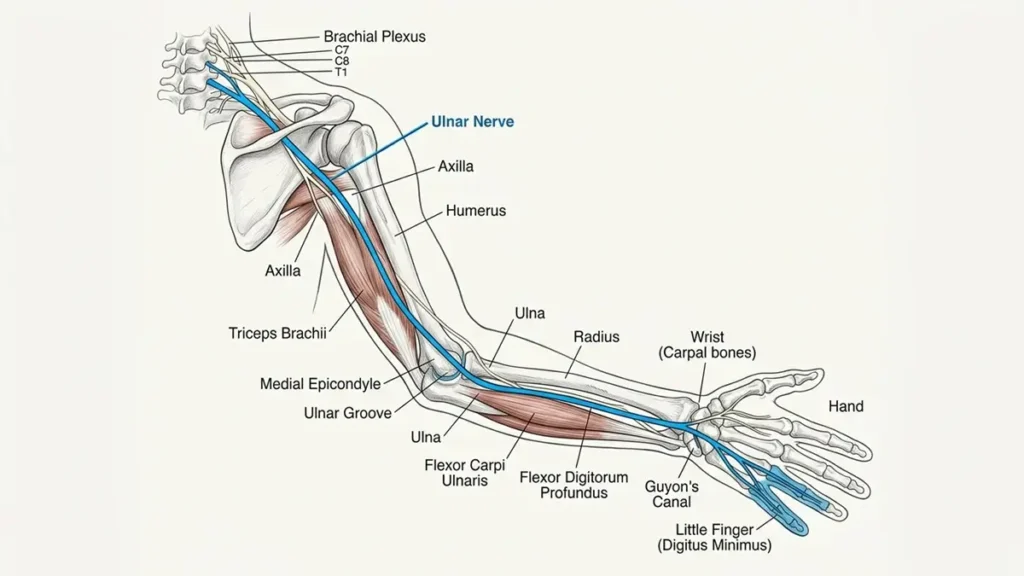
There is a fascinating curiosity I found in my research: “What is the ulnar paradox?”
When we hit our elbow on the corner of a table, we feel a horrible shock shooting down to the pinky. That is an acute compression of the ulnar nerve. The paradox lies in the fact that chronic injury (the one I was developing) doesn’t come from a hit, but rather from keeping the arm still and bent for hours.
The same nerve that hurts upon impact suffers silently from prolonged poor posture. It doesn’t like being stretched or compressed for too long.
It’s Not Just a Knock: How Typing and Cell Phone Use “Squeeze” the Nerve
As a content creator and teacher grading papers, I spend hours with my elbows resting on the desk and my arms bent at a sharp angle. Add to that the modern habit of holding a cell phone with the arm bent close to the body or, worse, resting it on the little finger (have you noticed how we do that?).
How Does Cell Phone Use Affect the Ulnar Nerve?
When we hold the smartphone with the arm fully bent for a long time, the ulnar nerve is stretched and pressed in the elbow region. It’s like stepping on a garden hose for hours; the water (in this case, the nerve impulse) stops flowing properly. The result? The nighttime numbness that disrupts the sleep of anyone over fifty or sixty.
The Red Alert: What Is “Claw Hand” and How to Avoid Getting There
In my searches on Google Planner and related questions, one expression jumped out with a tone of urgency: “The so-called ‘claw hand’ is not just a deformity…”.
We need to be frank here, like a teacher giving a caring scolding to a distracted student. If we ignore the numbness for years, the muscles in the hand that depend on the ulnar nerve begin to atrophy. The result is the inability to straighten the little and ring fingers, which remain permanently curved, like a claw.
Note of Hope: This stage is severe, but it is preventable. The symptoms I felt (and that you may be feeling now) are the yellow warning light. It’s the body alerting us that there is still time to change posture and strengthen the area before the damage becomes irreversible. Physical therapy at this stage is pure gold.
⚠️ Important Medical Disclaimer
This article reports the author’s personal experience with nerve compression symptoms and is for educational and informational purposes only. The information contained herein does not, under any circumstances, replace a consultation with an orthopedic doctor, physiatrist, or neurologist.
Only a healthcare professional can perform a detailed physical examination and request additional tests, such as Electroneuromyography, to confirm the diagnosis and prescribe the appropriate treatment. Self-medication or performing exercises without professional supervision can worsen the condition.
Saving the Teacher’s Arm: Ergonomics and Exercises for the Ulnar Nerve
It’s not enough to just complain; action is needed. Inspired by guidelines from the American Society for Surgery of the Hand (ASSH) and the MSD Manual, I’ve put together an action plan that I’m already implementing at my workstation.

1. Adjustments in the “Cockpit” (Ergonomics for 60+):
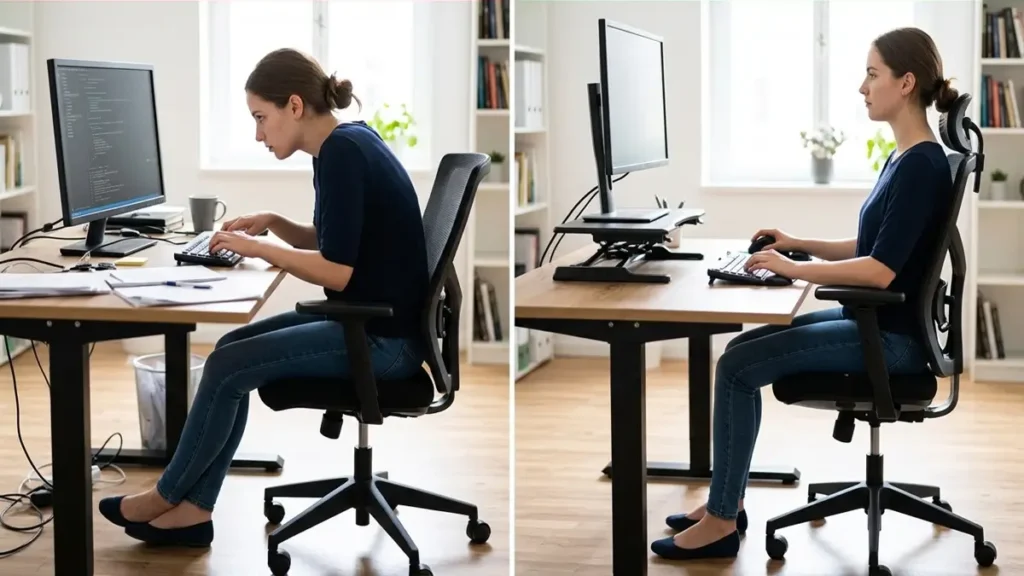
- Straight Wrists: The mouse and keyboard should be at a height that allows the wrist to stay straight, without bending up or down.
- Free Elbows: Avoid resting your body weight on your elbows on the desk. Ideally, arm support should be on the forearm, or the chair should have adjustable armrests.
- The Miracle of the Vertical Mouse: I confess I bought one of those ergonomic mice that puts your hand in a “handshake” position. It takes the pressure off the base of the wrist and, consequently, relieves tension in the cubital tunnel.
2. The Medicine of Movement (Do This Now):
- Ulnar Nerve Glide: Sit up straight. Extend your left arm out to the side with your palm facing up. Bend your wrist downward, pointing your fingers toward the floor. Now, tilt your head to the right side (away from the extended arm). You will feel a “good” stretch traveling from your neck down your arm. Hold for 20 seconds and switch sides.
3. When “Do It Yourself” Isn’t Enough:
If the numbness doesn’t go away with postural changes, don’t play the hero. An orthopedist or physiatrist is the right professional to order tests (like electroneuromyography) and refer you to physical therapy. As an educator, I say: technical knowledge saves, but medical diagnosis cures.
Digital Survival Checklist for Blog Readers
Print this out and stick it next to your monitor. Every 60 minutes, stop and mentally answer:
- Are my feet flat on the floor (or on a footrest)?
- Are my elbows forming an angle greater than 90 degrees?
- Is my monitor at eye level (so I’m not thrusting my neck forward)?
- Is my wrist straight while using the mouse?
- Have I gotten up to drink water and stretch in the last 60 minutes?
Conclusion: The Wisdom of Old Hardware
Writing this article again was almost a physical therapy session for the soul. I discovered that the technological evolution I cherish so much gives us incredible tools, but it doesn’t shield us from the laws of physics and biology.
The body of a sixty-something man who teaches Chemistry and loves computers needs balance (which, coincidentally, is the name of this blog). The pain in my forearm and the numbness in my pinky taught me a valuable lesson: there’s no point in having the best graphics card or the fastest SSD if the “central processor” (the cervical spine) and the “data cables” (the nerves) are damaged.
If you, like me, live with your hand on the mouse and your eye on the screen, take care of your biological “hardware.” It doesn’t have an extended warranty, and replacing parts isn’t as simple as swapping out a keyboard.
A big hug and happy (and healthy) browsing!
Frequently Asked Questions About Numbness in the Hands and Little Finger
1. What causes numbness in the little finger when using a computer?
The most common cause is compression of the Ulnar Nerve at the elbow (Cubital Tunnel Syndrome). This happens when we keep our arms bent and resting on the desk for hours, pressing on the nerve that provides sensation to the little finger and part of the ring finger.
2. What are the first signs of ulnar nerve injury?
The first signs are tingling and numbness in the little finger and half of the ring finger, especially at night. Many people also report a fine, persistent pain on the inner side of the elbow or in the forearm.
3. How does cell phone use affect the ulnar nerve?
Holding a cell phone with the arm fully bent and the device resting on the little finger stretches and compresses the ulnar nerve at the elbow. This habit, maintained for long periods, worsens numbness symptoms and can accelerate nerve wear.
4. What is “claw hand” in the context of the ulnar nerve?
It is an advanced stage of the injury where lack of treatment leads to muscle atrophy in the hand. The patient loses strength and the ability to straighten the little and ring fingers, which remain permanently curved. Fortunately, it is a preventable condition with early diagnosis and physical therapy.
5. What is the best exercise to relieve ulnar nerve numbness?
Neural gliding stretches are very effective. Sit upright, extend your arm to the side with the palm facing up. Bend the wrist down (fingers pointing to the floor) and tilt the head to the opposite side. Hold for 20 seconds and repeat a few times a day. Never force it if there is sharp pain.

About me: I’m Marcos Fonseca, a Chemistry and Computer Science professor for over 20 years — and passionate about transforming science into real-world practice. Here, you’ll find fact-based content, without magical promises. If this space suits you, feel free to explore — and 👉 learn more about my journey